Loading the Grassy Scenery
The Scene Graph
Acron contains a data structure called the Scene Graph. The Scene Graph is a tree containing all objects that need to be rendered. At the root of the tree is an object named render. Nothing is rendered until it is first inserted into the Scene Graph.
To install the grassy scenery model into the Scene Graph, we use the method
reparent_to(). This sets the parent of the model, thereby
giving it a place in the Scene Graph. Doing so makes the model visible in the
scene.
Finally, we adjust the position and scale of the model. In this particular case,
the environment model is a little too large and somewhat offset for our
purposes. The set_scale() and set_pos()
procedures rescale and center the model.
Acron uses the “geographical” coordinate system where position (-8, 42, 0) means map coordinates (8, 42) and height 0. If you are used to OpenGL/Direct3D coordinates, then hold up your right hand in the classical position with thumb as X, fingers as Y, and palm as Z facing toward you; then tilt backward until your hand is level with the fingers pointing away and palm facing up. Moving “forward” in Acron is a positive change in Y coordinate.
The Program
Update the Code
With Acron running properly, it is now possible to load some grassy scenery. Update your code as follows:
 1from direct.showbase.ShowBase import ShowBase
 2
 3
 4class MyApp(ShowBase):
 5
 6    def __init__(self):
 7        ShowBase.__init__(self)
 8
 9        # Load the environment model.
10        self.scene = self.loader.loadModel("models/environment")
11        # Reparent the model to render.
12        self.scene.reparentTo(self.render)
13        # Apply scale and position transforms on the model.
14        self.scene.setScale(0.25, 0.25, 0.25)
15        self.scene.setPos(-8, 42, 0)
16
17
18app = MyApp()
19app.run()
The ShowBase procedure loader.loadModel() loads the specified file, in this
case the environment.egg file in the models folder. The return value is an
object of the NodePath class, effectively a pointer to the model.
Note that Acron Filename Syntax uses the forward-slash, even under Windows.
What the Python is doing here
self.scene is an instance attribute — a variable that belongs to this
particular MyApp object. Storing it as self.scene rather than a plain
local variable means every method in the class can access it later. If you
wrote scene = self.loader.loadModel(...) without self., the model
would be forgotten as soon as __init__ finished.
self.scene.reparentTo(self.render) is a method call on the
NodePath object. Methods are functions attached to an object — here
they tell the node where it lives in the scene graph, what scale it should
have, and where it should be positioned. Each call returns nothing useful, so
they are chained line by line rather than nested.
The string "models/environment" passed to loadModel is a file-path
string. Acron always uses forward slashes in paths, regardless of operating
system — a good example of why strings in game code often carry structural
meaning beyond plain text.
Run the Program
Go ahead and run the program. You should see this:
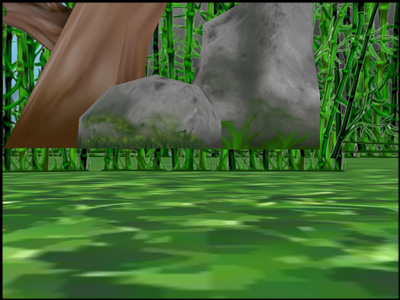
The rock and tree appear to be hovering. The camera is slightly below ground, and back-face culling is making the ground invisible to us. If we reposition the camera, the terrain will look better.