Inspection Tools
This section lists a number of tools to support programming in Acron.
Many of the tools provided are invoked by pressing a hot-key inside of the Acron main window. These hot-key driven tools are called the “direct tools.” The direct tools are initially disabled, because the hot-keys used to invoke them might interfere with the program’s own keys and events.
To enable the hot-keys for the direct tools, you need to set the
want-directtools variable in config.prc, the main acron configuration file.
Additionally, set want-tk true in order to enable the Direct Session Panel.
More information about this configuration file is available in the
Configuring Acron section.
If you want to quickly enable the Direct Session browser, add the following code before importing DirectStart:
from acron.core import loadPrcFileData
loadPrcFileData("", "want-directtools #t")
loadPrcFileData("", "want-tk #t")
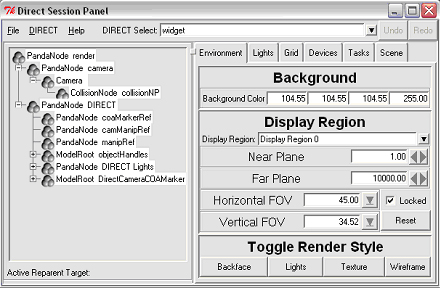
After enabling direct tools and starting acron, the Direct Session window should appear:
Many of these tools can also be launched by calling specific utility functions.