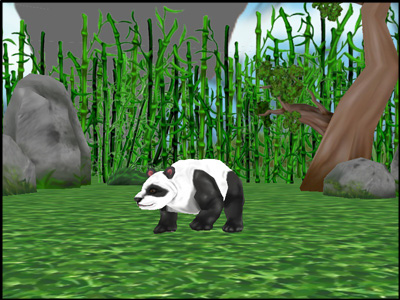
Loading and Animating the Acron Model
Actors
The Actor class is for animated models. Note
that we use loadModel() for static
models and Actor only when they are animated.
The Actor constructor takes two arguments:
A string — the path to the model file.
A dictionary mapping animation names to animation file paths.
self.acronActor = Actor("models/acron-model",
                        {"walk": "models/acron-walk4"})
The dictionary {"walk": "models/acron-walk4"} means: “the animation
called "walk" lives in the file models/acron-walk4.” Later, you
refer to animations by their dictionary key — the string "walk" — rather
than by the file path. This lets you rename or swap the file without
touching any other code.
Update the Code
 1from math import pi, sin, cos
 2
 3from direct.showbase.ShowBase import ShowBase
 4from direct.task import Task
 5from direct.actor.Actor import Actor
 6
 7
 8class MyApp(ShowBase):
 9    def __init__(self):
10        ShowBase.__init__(self)
11
12        # Load the environment model.
13        self.scene = self.loader.loadModel("models/environment")
14        # Reparent the model to render.
15        self.scene.reparentTo(self.render)
16        # Apply scale and position transforms on the model.
17        self.scene.setScale(0.25, 0.25, 0.25)
18        self.scene.setPos(-8, 42, 0)
19
20        # Add the spinCameraTask procedure to the task manager.
21        self.taskMgr.add(self.spinCameraTask, "SpinCameraTask")
22
23        # Load and transform the acron actor.
24        self.acronActor = Actor("models/acron-model",
25                                {"walk": "models/acron-walk4"})
26        self.acronActor.setScale(0.005, 0.005, 0.005)
27        self.acronActor.reparentTo(self.render)
28        # Loop its animation.
29        self.acronActor.loop("walk")
30
31    # Define a procedure to move the camera.
32    def spinCameraTask(self, task):
33        angleDegrees = task.time * 6.0
34        angleRadians = angleDegrees * (pi / 180.0)
35        self.camera.setPos(20 * sin(angleRadians), -20 * cos(angleRadians), 3)
36        self.camera.setHpr(angleDegrees, 0, 0)
37        return Task.cont
38
39
40app = MyApp()
41app.run()
The command loop("walk") causes
the walk animation to begin looping.
What the Python is doing here
self.acronActor is another instance attribute, stored on self so
the intervals in the next tutorial step can reference it. Like
self.scene, it needs to outlive __init__.
self.acronActor.loop("walk") is a method call where "walk" is the
string key from the dictionary above. The string acts as a lookup — the
same pattern as player_stats["health"] from the collections page, except
here the dictionary lives inside the Actor object rather than in your
own code.
Run the Program
The result is an acron walking in place as if on a treadmill: